

Mobile SEO Tips for Your Website: Optimizing for the Modern Web
In this blog, we’ll explore practical mobile SEO tips to help you enhance your website’s performance, and climb the mobile search rankings. Click here, to read more!
Table of Contents
In today’s digital-first world, mobile devices have become the primary way people access the internet. Whether it’s browsing social media, checking emails, or searching for products and services, smartphones dominate user behavior. This means mobile SEO is no longer optional, it’s essential. If your website isn’t optimized for mobile search, you risk losing visibility, traffic, and potential customers.
In this blog, we’ll explore practical mobile SEO tips to help you enhance your website’s performance, provide a better user experience, and climb the mobile search rankings.
Why Mobile SEO Matters
Before diving into the tips, let’s understand why mobile SEO is so crucial.
- Google Prioritizes Mobile-First Indexing: Google now uses the mobile version of your website for indexing and ranking. If your mobile site is poorly optimized, your entire SEO strategy can suffer.
- User Behavior is Mobile-Centric: More than 60% of global website traffic comes from mobile devices. Users expect fast-loading, responsive, and intuitive mobile experiences.
- Higher Conversion Rates: A seamless mobile experience can boost user engagement, reduce bounce rates, and increase conversion rates.
Mobile SEO Tips for Your Website:
1. Make Your Website Mobile-Friendly
The first step to mobile SEO success is ensuring your website is mobile-friendly. That means it should:
- Adjust to various screen sizes (responsive design)
- Use readable fonts and scalable images
- Have easily clickable buttons and links
- Avoid pop-ups that disrupt the mobile experience
You can use Google’s Mobile-Friendly Test to check how well your site performs on mobile devices and identify improvements.
2. Optimize Page Load Speed
Mobile users are impatient. If your site takes more than a few seconds to load, they’ll likely bounce. Slow loading times can also hurt your SEO rankings.
Tips to improve mobile speed:
- Compress images using tools like TinyPNG or WebP format
- Use a content delivery network (CDN)
- Minimize CSS, JavaScript, and HTML
- Enable browser caching and lazy loading
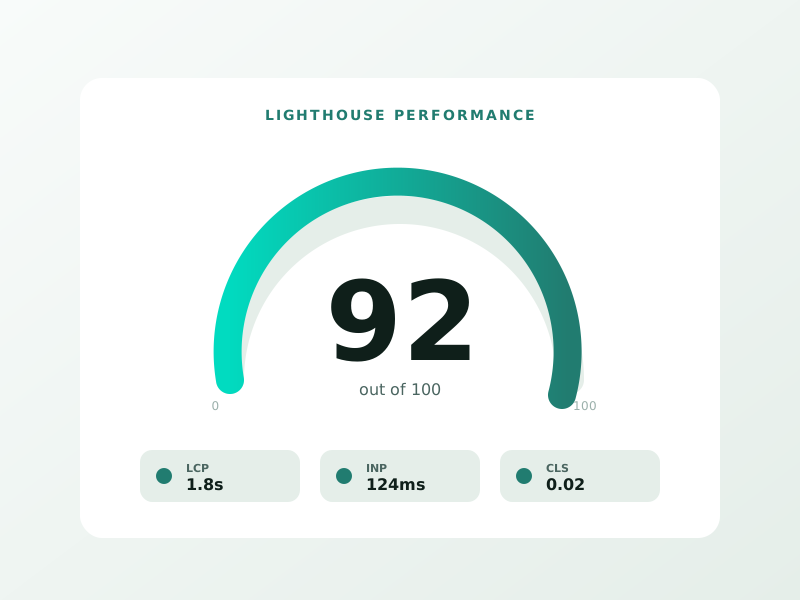
You can check your site speed using Google PageSpeed Insights and implement their suggestions to improve performance.
3. Use Responsive Web Design
Responsive web design ensures your website looks and works well on all devices, desktops, tablets, and phones. Instead of creating separate mobile and desktop versions, responsive design uses flexible layouts that automatically adapt to different screen sizes.
Key benefits:
- Google recommends it
- Easier to maintain
- Consistent user experience
Make sure your developer uses responsive frameworks like Bootstrap or CSS media queries to maintain layout integrity across devices.
4. Improve Mobile UX (User Experience)
SEO isn’t just about keywords and backlinks, it’s also about how users interact with your site. A good mobile user experience keeps visitors engaged and reduces bounce rates.
Tips to enhance mobile UX:
- Use clear, easy-to-navigate menus
- Keep form fields minimal and easy to fill out
- Avoid large blocks of text, break them up with headings, bullets, and images
- Ensure all buttons are touch-friendly and well-spaced
Think mobile-first when designing new pages or elements. Prioritize simplicity and ease of use.
5. Optimize for Local Mobile SEO
Mobile users often search for location-based services, especially “near me” searches like “coffee shop near me” or “best dentist in [city].” To rank higher in local mobile searches, follow these tips:
- Create and verify your Google Business Profile
- Use local keywords (e.g., “wedding planner in NYC”)
- Ensure your name, address, and phone number (NAP) are consistent across all listings
- Encourage customers to leave Google reviews
Local mobile SEO service is crucial for brick-and-mortar businesses looking to attract nearby customers.
6. Prioritize Voice Search Optimization
With voice assistants like Siri, Alexa, and Google Assistant becoming more common, optimizing for voice search is an emerging mobile SEO trend.
Tips for voice search:
- Focus on natural, conversational language
- Answer common questions using FAQs
- Optimize for long-tail keywords
- Use structured data (schema markup) to help search engines understand your content better
For example, instead of targeting “best pizza NYC,” use a voice-optimized phrase like “Where can I find the best pizza in New York City?”
7. Eliminate Intrusive Interstitials (Pop-ups)
Pop-ups that cover the main content or are hard to close can be frustrating for mobile users. They not only hurt the user experience but can also negatively impact your rankings.
Google penalizes sites that use intrusive interstitials, especially those that appear immediately when a user visits from search.
Best practices:
- Use non-intrusive banners instead of full-screen pop-ups
- Ensure pop-ups are easy to close
- Avoid using pop-ups that appear before users see your main content
8. Use Mobile-Friendly Content Formats
Avoid content formats that aren’t supported on mobile devices, like Flash or outdated plugins. Instead, use HTML5 for animations and interactive elements.
Also, make sure your videos are responsive and optimized for mobile viewing. Platforms like YouTube or Vimeo embed well across devices.
9. Optimize Title Tags and Meta Descriptions for Mobile
Mobile search results often show shorter snippets, so your title tags and meta descriptions should be concise and compelling.
Tips:
- Keep title tags around 50-60 characters
- Keep meta descriptions under 120 characters
- Place the most important information first
- Use action-driven, mobile-friendly language
Make sure each page has a unique title and meta description that clearly reflects its content.
10. Monitor Mobile SEO Performance Regularly
Finally, you need to track your progress. Use tools like:
- Google Search Console – Monitor mobile usability, indexing, and search queries
- Google Analytics – Analyze mobile traffic and user behavior
- SEMRush or Ahrefs – Track mobile keyword rankings
Look out for high bounce rates or low conversion rates on mobile, these are signs your mobile experience needs improvement.
Conclusion
⚡ 2-minute scorecard · instant result
Is your website quietly costing you leads?
Answer 5 quick questions. Get your score + the top fixes, free.
1. Does your site load in under 3 seconds on mobile?
2. Is there one clear call-to-action above the fold?
3. Is your main lead form 5 fields or fewer?
4. Is the whole site genuinely mobile-friendly?
5. Are trust signals (proof, reviews) near your CTA?
With mobile-first indexing, changing user behavior, and evolving search trends, optimizing for mobile SEO is no longer optional, it’s critical for success. A mobile-optimized site ensures better visibility, higher engagement, and a smoother user experience.
By following these mobile SEO tips, like improving speed, using responsive design, enhancing UX, and optimizing for voice and local search, you’ll put your website in the best possible position to thrive in a mobile-driven world.
Start implementing these strategies today and turn mobile traffic into meaningful results for your business.
Ready to turn this into real bookings?
Free 30-min audit. We review your current setup and give you 3 specific wins — whether we work together or not. Starts at 0/month. No contract. One medspa per market.
Book My Free Audit →No credit card. No pitch. No 12-month lock-in.



