
UI UX Design Principles 2026 | A Practical Guide for Teams
The practical ui ux design principles 2026 playbook top agencies actually use. Real tactics, real numbers, zero fluff. Read in 7 min.
Table of Contents
- UI UX Design Principles 2026: What Actually Moves the Needle
- 1. Design for "scan first, read second"
- 2. Accessibility is a baseline, not a feature
- 3. Motion with a purpose
- 4. Designing for AI-native interactions
- 5. Forms are still the conversion battleground
- 6. Performance as a design decision
- 7. Micro-copy beats macro-design
- 8. Dark mode as a default option, not an afterthought
- 9. Consistency across the whole stack
- 10. Design decisions should be measurable
- Putting it together
- Keep reading
- Ready to turn traffic into revenue?
UI UX Design Principles 2026: What Actually Moves the Needle
Every year someone publishes a list of twenty-seven “rules” of UX. Most of them are recycled Nielsen heuristics dressed up for a new decade. This guide is different. These are the UI UX design principles 2026 that we actually apply when we redesign websites and products for clients, the ones that change conversion rates, not just portfolio screenshots.
If you want the short version: users have less patience than ever, AI is becoming part of every interface, accessibility is no longer optional, and motion has to do work, not decorate. Below, we break each of those down into something you can act on this week.
1. Design for "scan first, read second"
Assume the user already knows what your product does.
Eye-tracking studies from Nielsen Norman Group and our own session recordings agree on one thing: nobody reads a webpage in 2026. They scan, decide in roughly 1.7 seconds whether to invest more attention, and bail if the page doesn’t pass the sniff test.
What that means in practice:
– Front-load the value proposition. The first 8 words on the page have to answer “what is this and is it for me?”
– Use F-pattern or Z-pattern layouts above the fold. Don’t fight the way eyes move.
– Chunk content. No paragraph over four lines. Every H2 earns its keep.
– Bold the first sentence of each block. It’s the one line most users will read.
A quick test: screenshot your homepage, blur it, and look at it for two seconds. Can you tell what the business does? If not, you have a scannability problem, not a content problem.
2. Accessibility is a baseline, not a feature
⚡ 2-minute scorecard · instant result
Is your website quietly costing you leads?
Answer 5 quick questions. Get your score + the top fixes, free.
1. Does your site load in under 3 seconds on mobile?
2. Is there one clear call-to-action above the fold?
3. Is your main lead form 5 fields or fewer?
4. Is the whole site genuinely mobile-friendly?
5. Are trust signals (proof, reviews) near your CTA?
The European Accessibility Act came into force in mid-2025. ADA lawsuits in the US have climbed every year for eight years running. In 2026, shipping an inaccessible interface is both ethically bankrupt and legally risky.
Get a free 30-minute growth audit.
The principles that matter:
– Contrast ratio 4.5:1 minimum for body text, 3:1 for large text. Test with the WebAIM Contrast Checker.
– Keyboard navigation must work everywhere. Tab through your entire flow once a month.
– Semantic HTML first, ARIA only where necessary. A `
– Alt text for every meaningful image. Decorative images get `alt=””`.
– Respect `prefers-reduced-motion`. Around 35% of users have vestibular sensitivity or simply prefer calm interfaces.
Accessibility overlaps with SEO more than most teams realize. The same semantic structure that helps a screen reader helps Google parse the page. If you’re investing in SEO, accessibility work pays double.
3. Motion with a purpose
In 2020 every landing page had parallax. In 2023 every hero section had a Lottie animation. In 2026 we’ve hopefully learned that motion is a tool, not a garnish.
Good motion in 2026 does three things:
1. Directs attention, subtle shift tells you what to look at next.
2. Confirms action, button press animation, form success checkmark, cart slide-in.
3. Softens transitions, page changes don’t feel like hard cuts.
Bad motion does the opposite: it interrupts, repeats, plays on scroll for no reason, or autoplays video that makes users hit the back button. If you can’t explain in one sentence why an animation exists, delete it. Our UI/UX team audits motion on every handoff for exactly this reason.
4. Designing for AI-native interactions
The biggest shift from 2024 to 2026 isn’t visual, it’s behavioral. A growing share of your users arrive via ChatGPT, Perplexity, Gemini, or Claude, and many expect to *converse* with your product rather than click through it.
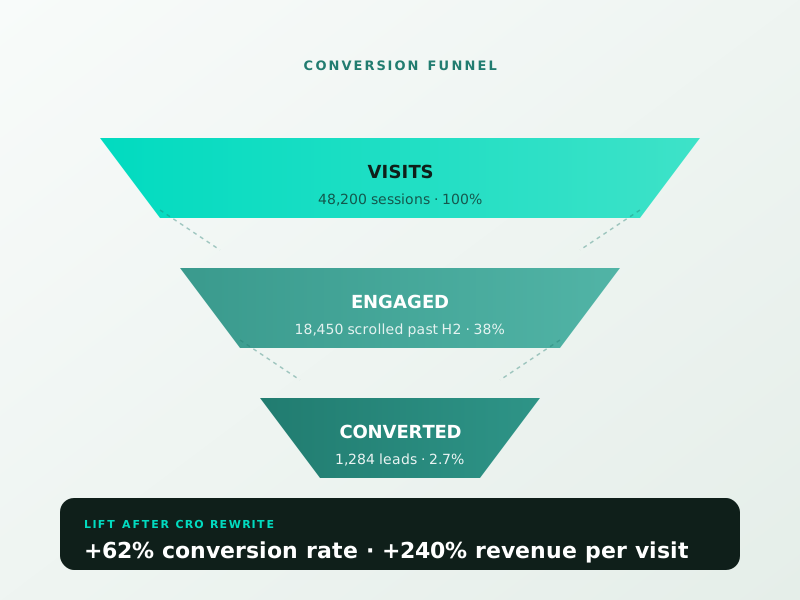
CONVERSION FUNNEL
VISITS
48,200 sessions · 100%
ENGAGED
18,450 scrolled past H2 · 38%
CONVERTED
1,284 leads · 2.7%
LIFT AFTER CRO REWRITE
+62% conversion rate · +240% revenue per visit
Principles for AI-native design:
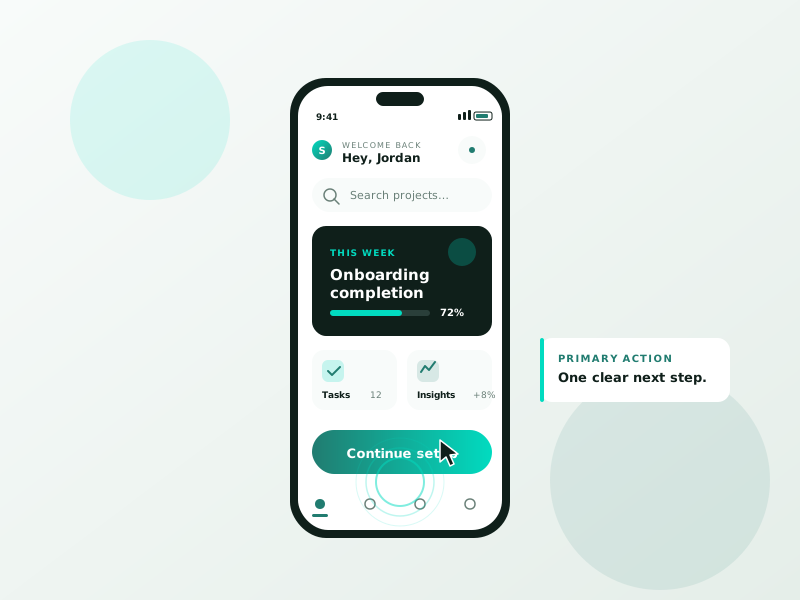
– Assume the user already knows what your product does. They were told by an AI. Skip the marketing preamble, give them the flow.
– Offer natural language entry points, a “describe what you need” input instead of a 12-field form where possible.
– Make your content quotable. AI crawlers extract short, declarative passages. Write headings as questions when natural, answer them in one paragraph.
– Structure data with Schema.org markup. It’s the single highest-leverage 2026 change, AI answer engines heavily weight JSON-LD signals.
This doesn’t mean shoving an AI chatbot into your hero section. It means respecting that AI is now part of the funnel, not the destination.
5. Forms are still the conversion battleground
Eighty percent of conversion lift on most sites still comes from form optimization. The UI UX design principles in 2026 here haven’t changed much, they’re just more rigorously enforced.
– One question per screen for high-stakes flows (B2B demos, long surveys).
– Progressive disclosure. Don’t show fields until the prior answer requires them.
– Inline validation. Errors show *as the user types*, not after submit.
– Autofill for everything. `autocomplete=”email”` is not optional.
– Forgive format. Phone numbers with spaces, zip codes with dashes, normalize server-side.
If you’re doing a website redesign, measure form completion rate before and after. A well-designed form can lift lead volume 30–60% on its own.
6. Performance as a design decision
In 2026, if your largest contentful paint is over 2.5 seconds, Google penalizes you and users leave. Core Web Vitals aren’t a developer concern anymore, designers have to own them too.
Design decisions that affect performance:
– Font count. Every custom font delays first render. Pick one family, two weights.
– Hero image size. A 3MB hero banner is never acceptable. Serve WebP at 2x the rendered size, max.
– Third-party scripts. Every chat widget, analytics pixel, and A/B test adds latency. Audit what you actually need.
– Layout shift. Reserve space for images and embeds. CLS above 0.1 feels broken to users even if they can’t name it.
Speed is a feature. We routinely double organic traffic for clients just by halving their page weight, no new content needed.
7. Micro-copy beats macro-design
You can have a beautiful interface with bad copy and users will hate it. You can have an ugly interface with crystal-clear copy and users will forgive it. The ratio matters.
Micro-copy principles for 2026:
– Replace “Submit” with what happens next. “Get my free audit” beats “Submit.”
– Error messages tell the user what to do, not what they did wrong. “Enter a valid email like [email protected]” beats “Invalid email format.”
– Labels above inputs, not inside (inside-labels disappear when typing, inaccessible).
– Use plain English. If a sixth-grader couldn’t understand the button, rewrite it.
Good copy is brand identity in action. It’s how your company sounds when nobody is watching.
8. Dark mode as a default option, not an afterthought
In 2026, around 70% of users on OS-level dark mode expect your site to respect their preference. Not offering a dark variant is a small UX failure that compounds with every return visit.
Build it with CSS custom properties and a `prefers-color-scheme` media query, test contrast in both modes, and make sure images don’t glow like the sun on a dark background. A good graphic design system includes dark-mode asset variants by default.
9. Consistency across the whole stack
Nothing erodes user trust faster than a polished landing page that leads to a clunky checkout that leads to a broken email. Every touchpoint is part of the UX, including the email receipt, the error page, and the Tuesday newsletter.
Audit every touchpoint quarterly. Keep a single design tokens file that governs color, spacing, type, and motion everywhere. Kill orphan pages that weren’t updated when the rest of the brand moved on.
10. Design decisions should be measurable
The final principle underneath all the others: if you can’t measure whether a change helped, you’re doing decoration, not design.
Every meaningful change should have:
– A hypothesis (“clearer hero copy will increase free-trial starts”).
– A metric (trial signup rate, week over week).
– A test period (minimum one full traffic cycle, usually 7 or 14 days).
– A decision rule (revert if down more than X%, ship if up more than Y%).
This is how good UX teams earn budget. It’s also how you separate real improvements from aesthetic preferences.
Putting it together
You don’t need to apply all ten principles tomorrow. Pick two that are weakest for your product right now, usually form UX or performance, and fix those first. Re-measure. Move on.
If you want a second pair of eyes on where your interface is leaking users, we offer a free 30-minute UX audit call. Book a free consultation and we’ll walk through your top three fixes together, no obligation.
The principles change slowly. What changes fast is how rigorously teams enforce them. In 2026, the winners are the ones who treat UX as a measurable discipline, not a matter of taste.
Ready to turn this into real bookings?
Free 30-min audit. We review your current setup and give you 3 specific wins — whether we work together or not. Starts at 0/month. No contract. One medspa per market.
Book My Free Audit →No credit card. No pitch. No 12-month lock-in.
Accessibility overlaps with SEO more than most teams realize. The same semantic structure that helps a screen reader helps Google parse the page. If you’re investing in SEO, accessibility work pays double.
3. Motion with a purpose
In 2020 every landing page had parallax. In 2023 every hero section had a Lottie animation. In 2026 we’ve hopefully learned that motion is a tool, not a garnish.
Good motion in 2026 does three things:
1. Directs attention, subtle shift tells you what to look at next.
2. Confirms action, button press animation, form success checkmark, cart slide-in.
3. Softens transitions, page changes don’t feel like hard cuts.
Bad motion does the opposite: it interrupts, repeats, plays on scroll for no reason, or autoplays video that makes users hit the back button. If you can’t explain in one sentence why an animation exists, delete it. Our UI/UX team audits motion on every handoff for exactly this reason.
4. Designing for AI-native interactions
The biggest shift from 2024 to 2026 isn’t visual, it’s behavioral. A growing share of your users arrive via ChatGPT, Perplexity, Gemini, or Claude, and many expect to *converse* with your product rather than click through it.
Principles for AI-native design:
– Assume the user already knows what your product does. They were told by an AI. Skip the marketing preamble, give them the flow.
– Offer natural language entry points, a “describe what you need” input instead of a 12-field form where possible.
– Make your content quotable. AI crawlers extract short, declarative passages. Write headings as questions when natural, answer them in one paragraph.
– Structure data with Schema.org markup. It’s the single highest-leverage 2026 change, AI answer engines heavily weight JSON-LD signals.
This doesn’t mean shoving an AI chatbot into your hero section. It means respecting that AI is now part of the funnel, not the destination.
5. Forms are still the conversion battleground
Eighty percent of conversion lift on most sites still comes from form optimization. The UI UX design principles in 2026 here haven’t changed much, they’re just more rigorously enforced.
– One question per screen for high-stakes flows (B2B demos, long surveys).
– Progressive disclosure. Don’t show fields until the prior answer requires them.
– Inline validation. Errors show *as the user types*, not after submit.
– Autofill for everything. `autocomplete=”email”` is not optional.
– Forgive format. Phone numbers with spaces, zip codes with dashes, normalize server-side.
If you’re doing a website redesign, measure form completion rate before and after. A well-designed form can lift lead volume 30–60% on its own.
6. Performance as a design decision
In 2026, if your largest contentful paint is over 2.5 seconds, Google penalizes you and users leave. Core Web Vitals aren’t a developer concern anymore, designers have to own them too.
Design decisions that affect performance:
– Font count. Every custom font delays first render. Pick one family, two weights.
– Hero image size. A 3MB hero banner is never acceptable. Serve WebP at 2x the rendered size, max.
– Third-party scripts. Every chat widget, analytics pixel, and A/B test adds latency. Audit what you actually need.
– Layout shift. Reserve space for images and embeds. CLS above 0.1 feels broken to users even if they can’t name it.
Speed is a feature. We routinely double organic traffic for clients just by halving their page weight, no new content needed.
7. Micro-copy beats macro-design
You can have a beautiful interface with bad copy and users will hate it. You can have an ugly interface with crystal-clear copy and users will forgive it. The ratio matters.
Micro-copy principles for 2026:
– Replace “Submit” with what happens next. “Get my free audit” beats “Submit.”
– Error messages tell the user what to do, not what they did wrong. “Enter a valid email like [email protected]” beats “Invalid email format.”
– Labels above inputs, not inside (inside-labels disappear when typing, inaccessible).
– Use plain English. If a sixth-grader couldn’t understand the button, rewrite it.
Good copy is brand identity in action. It’s how your company sounds when nobody is watching.
8. Dark mode as a default option, not an afterthought
In 2026, around 70% of users on OS-level dark mode expect your site to respect their preference. Not offering a dark variant is a small UX failure that compounds with every return visit.
Build it with CSS custom properties and a `prefers-color-scheme` media query, test contrast in both modes, and make sure images don’t glow like the sun on a dark background. A good graphic design system includes dark-mode asset variants by default.
9. Consistency across the whole stack
Nothing erodes user trust faster than a polished landing page that leads to a clunky checkout that leads to a broken email. Every touchpoint is part of the UX, including the email receipt, the error page, and the Tuesday newsletter.
Audit every touchpoint quarterly. Keep a single design tokens file that governs color, spacing, type, and motion everywhere. Kill orphan pages that weren’t updated when the rest of the brand moved on.
10. Design decisions should be measurable
The final principle underneath all the others: if you can’t measure whether a change helped, you’re doing decoration, not design.
Every meaningful change should have:
– A hypothesis (“clearer hero copy will increase free-trial starts”).
– A metric (trial signup rate, week over week).
– A test period (minimum one full traffic cycle, usually 7 or 14 days).
– A decision rule (revert if down more than X%, ship if up more than Y%).
This is how good UX teams earn budget. It’s also how you separate real improvements from aesthetic preferences.
Putting it together
You don’t need to apply all ten principles tomorrow. Pick two that are weakest for your product right now, usually form UX or performance, and fix those first. Re-measure. Move on.
If you want a second pair of eyes on where your interface is leaking users, we offer a free 30-minute UX audit call. Book a free consultation and we’ll walk through your top three fixes together, no obligation.
The principles change slowly. What changes fast is how rigorously teams enforce them. In 2026, the winners are the ones who treat UX as a measurable discipline, not a matter of taste.
Sprout Sage Solutions
Newsletter
Get 1 growth tip a week.
No fluff. No 10-email sequences. Just one idea that moves a metric.
Keep reading
Small Business Web Design Cost in 2026 – Real Pricing Guide
"Landing Page Design Best Practices for 2026 Conversions"
How Much Does SEO Cost in 2026? Real Pricing, No Agency Speak
Ready to turn traffic into revenue?
Keep reading
Ready to turn this into real bookings?
Free 30-min audit. We review your current setup and give you 3 specific wins — whether we work together or not. Starts at 0/month. No contract. One medspa per market.
Book My Free Audit →No credit card. No pitch. No 12-month lock-in.



