
Landing Page Design Best Practices for 2026 Conversions
The practical "landing page design best practices" playbook top agencies actually use. Real tactics, real numbers, zero fluff. Read in 7 min.
Table of Contents
- Start with Message Match, Not Design
- The Above-the-Fold Formula That Still Works
- Write Copy Like You Would Say It
- Design Elements That Move Conversion
- Trust Signals: Specific Beats Generic
- Form Design That Doesn't Kill Conversion
- Speed Is a Conversion Lever, Not a Technical Concern
- Mobile-First, Not Mobile-Responsive
- The A/B Testing Priorities That Matter
- The Pre-Launch Checklist
- Common Reasons Landing Pages Fail
- Get a Landing Page That Actually Converts
- Keep reading
- Ready to turn traffic into revenue?
These landing page design best practices are the ones we apply on every paid-traffic build that has to hit a conversion number. A landing page is not a homepage, not a brochure, and not a blog post. It has one job: convert a visitor who clicked an ad or email into a lead or sale. The median landing page converts at 2.35%. The top 10% convert at 11% or higher. The gap is not luck, it is design discipline. Here is what separates the pages that pay for themselves from the ones that quietly burn ad budget in 2026.
Start with Message Match, Not Design
Message match is the single biggest predictor of landing page performance. If the ad promises “50% off running shoes until Friday” and the landing page headline says “Welcome to Our Store,” conversion drops by 40–60%. The visitor does not trust they clicked the right thing.
Match three elements:
- Headline, mirrors the ad or email subject
- Offer, same discount, same product, same terms
- Visual, same hero image or product if possible
- Clear headline stating the outcome (not the product)
- One-sentence subhead explaining how
- Hero visual showing the product or result
- Single primary CTA button, high contrast
- One trust signal (logo bar, rating, specific number)
- Lead with the outcome, not the feature
- Use the word “you” more than “we”
- Replace adjectives with numbers where possible
- Cut any sentence longer than 20 words in half
- Read every paragraph aloud; rewrite anything that trips your tongue
- Button color contrast, the CTA should be the highest-contrast element on the page
- Whitespace, crowded pages convert 15–25% worse
- One column on mobile, always
- Directional cues, arrows, eye gaze in hero photos, subtle gradients
- Sticky CTA on scroll, +10–20% on long pages
- Real photography over stock, human faces lift trust
- Named customer logos (with permission)
- Review scores with source (Trustpilot 4.8/5, 2,341 reviews)
- Specific case study numbers (“cut CAC by 37% in 90 days”)
- Media mentions with the logo and publication name
- Security and compliance badges (SOC 2, GDPR) for SaaS
- Real video testimonials with name and title
- Ask for the minimum viable information (email is often enough for a lead)
- Use a single column layout, never two
- Mark required fields, not optional ones
- Inline validation, not post-submit errors
- Autocomplete attributes on every field
- Stack fields on mobile, never cram them side-by-side
- LCP under 2.0 seconds
- INP under 150ms
- CLS under 0.05
- Total page weight under 1MB
- Touch targets at least 44×44 pixels
- Primary CTA above the fold at all breakpoints
- No hover-dependent interactions
- Stack content vertically, no side-by-side comparisons
- Test with the thumb zone in mind
- Headline variants, expect 10–30% swings
- Offer framing (free trial vs. money-back guarantee), can double conversion
- Form length, usually the biggest single lever
- Social proof placement, above vs. below the fold
- CTA copy, “Get started” vs. “Send my quote” vs. “See pricing”
- Too many offers on one page
- Generic stock photos with no human faces
- Walls of text with no scannable structure
- Form asks for 10 fields when 3 would do
- No trust signals above the fold
- Mobile layout breaking below 400px
- Page speed over 5 seconds
- No clear value proposition in the headline
Every landing page should be built for a specific traffic source. One generic landing page serving Google, Meta, and LinkedIn ads is a budget leak.
The Above-the-Fold Formula That Still Works
Above the fold, the first screen a visitor sees, decides whether they scroll. Eye-tracking research in 2025 confirmed that 57% of attention stays in the first viewport. Blow the first screen, lose the visitor.
What has to be in the first 600 pixels:
No navigation menu. No social icons. No carousel. Every extra option dilutes the one action you want.
Write Copy Like You Would Say It
⚡ 2-minute scorecard · instant result
Is your website quietly costing you leads?
Answer 5 quick questions. Get your score + the top fixes, free.
1. Does your site load in under 3 seconds on mobile?
2. Is there one clear call-to-action above the fold?
3. Is your main lead form 5 fields or fewer?
4. Is the whole site genuinely mobile-friendly?
5. Are trust signals (proof, reviews) near your CTA?
Landing page copy should sound like you are talking to one person across a desk. Not “Our best-in-class platform empowers teams.” Just “Send better invoices in under 2 minutes.”
The five-rule copy checklist:
Concrete numbers (“save 4 hours a week”) outperform abstract claims (“save time”) by roughly 30% in our split tests.
Design Elements That Move Conversion
After 12 years of landing page work, the design elements that consistently lift conversion are boring and well-known:
Our UI/UX services team starts every landing page with a grayscale wireframe to force the hierarchy to work before color and imagery enter the picture.
Trust Signals: Specific Beats Generic
“Trusted by thousands” is noise. “Used by 12,483 accountants in the UK” is signal. The trust signals that actually work in 2026:
Rotate testimonials based on traffic source. An enterprise visitor wants to see enterprise logos. A freelancer wants to see freelancer stories.
Form Design That Doesn't Kill Conversion
Forms are where conversion goes to die. Every field cuts completion rate by 3–7%. The rules for 2026:
For B2B demos, three fields beats six every time, even if sales claims they need the extra data. Sales can enrich after the form submits using tools like Clearbit.
Speed Is a Conversion Lever, Not a Technical Concern
Every 100ms of load time cuts conversion by roughly 1% on e-commerce and 0.5% on B2B. A landing page that takes 4 seconds to load converts 20% worse than one that loads in 1.5 seconds, all else equal.
The 2026 performance targets for a landing page:
See our core web vitals explained guide for the full technical breakdown. For landing pages specifically, the single biggest win is killing any third-party script that is not essential, chat widgets, heatmap tools loaded on page load, marketing tag managers with 30+ tags.
Mobile-First, Not Mobile-Responsive
In 2026 roughly 72% of paid-traffic landing page visits are mobile. Designing for desktop and scaling down to mobile produces a bad mobile experience. Design on a 375px canvas first.
Mobile-first rules:
Our website design process mocks up every landing page at mobile first, then desktop, then tablet, in that order.
The A/B Testing Priorities That Matter
A/B testing a button color is theater. The tests that actually move numbers:
Run tests at 95% confidence with enough volume to detect a 15% lift. If your page gets under 500 visits a week, skip A/B testing and iterate on qualitative feedback instead.
For geographically targeted pages, localized landing pages outperform generic ones consistently. See how we handle this for web design in London, local case studies, local reviews, local pricing context.
The Pre-Launch Checklist
Before any landing page goes live run this 10-point check:
1. Message match with every ad feeding it
2. One CTA, repeated 2–4 times down the page
3. Mobile render at 375px, 414px, and 768px
4. PageSpeed Insights score above 90 on mobile
5. Form submits successfully and fires the correct tracking event
6. Thank-you page set up with conversion pixel
7. Analytics (GA4, server-side tagging) verified
8. Cross-browser test on Chrome, Safari, Firefox
9. Accessibility scan (WAVE, axe), no critical errors
10. Fallback plan if traffic spikes (CDN, cache headers)
For more on the technical fundamentals, our small business SEO checklist 2026 shares overlap with this list on Core Web Vitals, schema, and analytics setup.
Common Reasons Landing Pages Fail
After auditing 400+ landing pages in the last two years, the failure patterns repeat:
Get a Landing Page That Actually Converts
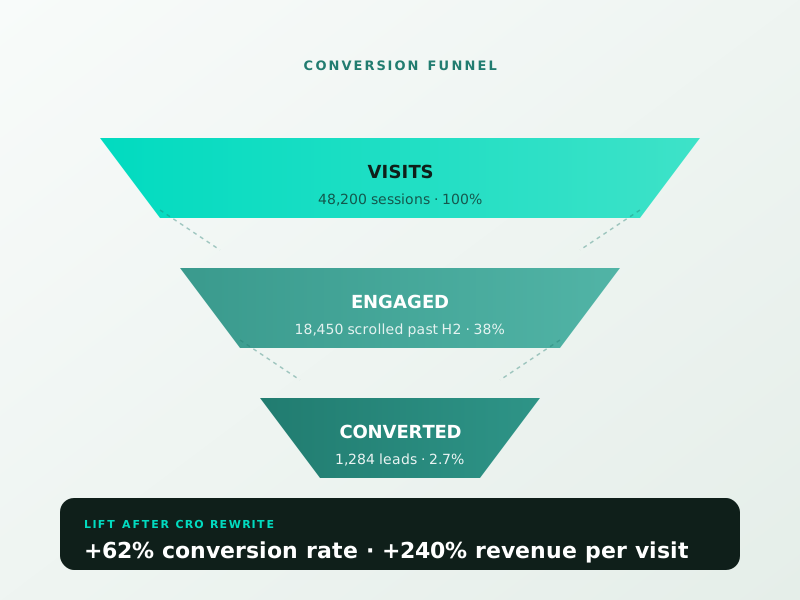
Designing a landing page is easy. Designing one that hits a cost-per-acquisition target on cold paid traffic is a different discipline. If you are spending on ads but not seeing the conversion rates you need, book a free consultation. We will review your current landing page, benchmark it against the best-in-class in your space, and map out the specific changes ranked by expected lift. Most of our clients see a 25–60% conversion lift inside 90 days, because the fundamentals above still work when applied honestly.
Get a free 30-minute growth audit.
Sprout Sage Solutions
Newsletter
Get 1 growth tip a week.
No fluff. No 10-email sequences. Just one idea that moves a metric.
Keep reading
"WordPress Security Best Practices: The 2026 Hardening Guide"
UI UX Design Principles 2026 | A Practical Guide for Teams
Small Business Web Design Cost in 2026 – Real Pricing Guide
Ready to turn traffic into revenue?
Ready to turn this into real bookings?
Free 30-min audit. We review your current setup and give you 3 specific wins — whether we work together or not. Starts at 0/month. No contract. One medspa per market.
Book My Free Audit →No credit card. No pitch. No 12-month lock-in.



